If you're reading this post, please log in and download all your ebooks, maps, and other files. I won't be deleting anything; instead, I will replace this site with a placeholder that includes contact information so customers can still access their books. However, it won't be as convenient for you or for me.
You will still have the option to purchase ebooks from DriveThruRPG.com and print books from Amazon. I may consider setting up a new storefront for selling books, as there are many software solutions available for that. However, the character generator and mapping software present a different challenge as they are custom-coded.
Regarding the d20 Modern Character Generator, I may consider making the code open source on GitHub. Although the code is quite old, it has the potential for improvement, and perhaps someone else can modernize it or individuals can run it locally.
As for Tiamat, please refrain from buying any additional tiles or maps that you cannot use immediately. There is no viable upgrade path for this tool, and it costs more to maintain than it generates in revenue. There are numerous other excellent mapping tools available, making open-sourcing the code (excluding the tiles) seem unnecessary.
I hope to publish again someday. I have numerous adventures, settings, and other games that are mostly complete, waiting for me to finish when I have more time. However, I've been saying that for years. :)
So, to reiterate, please log in and download all your ebooks, maps, and other files.
Back then I had just released a new Darwin’s World adventure and it was also the time of many personal changes, many of which have prevented me from doing much on the game front. First, I left my full time job and became a freelancer. It’s been a big success for me, but I took on a lot of projects over the last 3 years, so time for games has been short. Also, I had another kid, my fourth, so there’s that.
Despite my lack of time, the site has remained in operation and people continue to buy games and use the web apps I developed years ago. I’m really surprised how active it remains despite that I haven’t released any new books or added new features in nearly three years. Thanks everyone!
Now that I’m firmly back into self employment mode, I’m hoping to get back to games. But I also need to change this site to reflect my current life. RPGObjects is not just my publishing name, it’s also my business name, as well as the identity of most of my online activities (github, g+, etc...). So my immediate goal is to clean up this site and have a place for everything that matters. While I hope to post new blogs about gaming or some new book I’m editing, I also want somewhere to post about android development or an upcoming event I’m speaking at (like Devfest MN).
I have some goals I hope to achieve in 2016 both in publishing as well as for this site, but I’ll leave that for another post.
In the meantime, just a reminder, I still exist.
It's not ideal. When I saw it works, I don't mean it's flawless. But it's usable. Which is important to me since I spend a good deal of time these days on my phone and tablet.
Anyhow, I've been trying my best to clear my plate the last year so I can do more blogging and work on other projects. Getting this site working on mobile was one of those steps. Except a total resigned sometime in the not to distant future.
Gencon approaches and I want to continue with my gencon blogs I started last year. This is year 21 for me!
If you find something not working on the website due to these changes, please let me know asap (webmaster at rpgobjects.com).
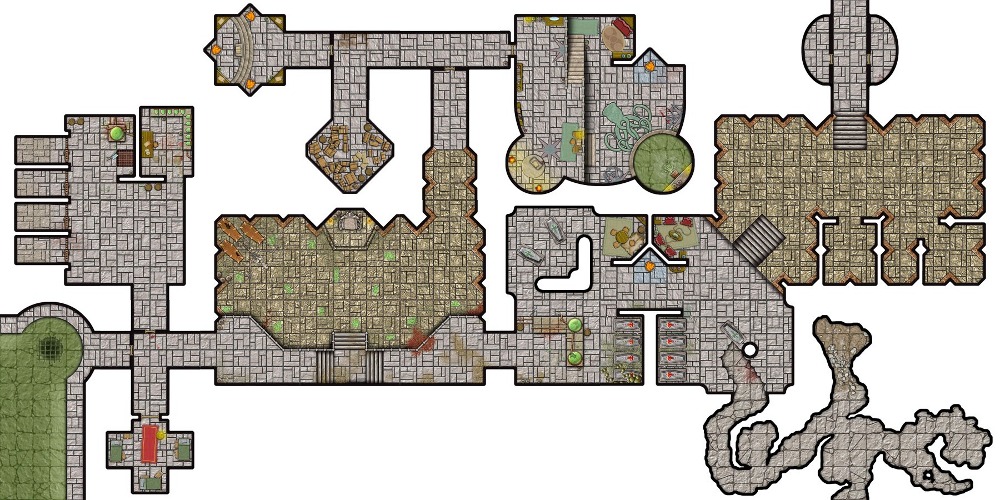
The main reason I pick this one as my winner was its unique design and the fact that I kept thinking of great adventure ideas to fill it.
A also choose two Runner Ups:
Tiogshi Laj's Sacrifice Halls:
It was a little on the busy side, but it seemed to used such a wide variety of tile sets.
John Reiher's Swamp Castle:
Super clean design and also gave me ideas for an adventures.
In addition, I changed the tile placement icon from a blue box to the tile(s) currently selected. Those tiles should standout from the other tiles on the map as they are slightly transparent (except on IE).
I think there will be 1 or 2 more updates before I drop the Beta tag to Tiamat. I'll blog about the ramifications of that in the not too distant future.
Also, remember, I'm still running the Tiamat Map Building Contents until December 1st.
So here it goes, the 1st official Tiamat Map Making contest!
The Prize:
1. FREE Miniature Map export of the winning map.
2. $5 credit added to your Tiamat balance.
How to Enter:
1. Create a map no larger 30 x 60 (the default size of new maps).
2. Make the map Public.
Rules:
1. Contest ends Dec 1st.
2. Make no more than 3 maps public.
3. Please do not use another person's public map as your submission. I can detect this and you will be disqualified (and magically cursed).
I created a new Tutorial Video: Creating a Map Start to Finish.